[ Developing and Launching a new New Replication System | Unreal Fest Orlando 2025 ]
https://www.youtube.com/watch?v=K472O2rVvG0
Peter Engstrom (Iris Co-Architect)
Welcome to developing and launching a new replication system. I'm Peter Engstrom.I work as a senior network programmer at Epic and I'm celebrating 25 years in the industry this year. But more importantly, I'm one of the architects of Iris. So that's what we're going to talk about today. So a bit about the background, design and architecture, userfacing components, porting, Fortnite, debugging and optimization, and the future. That's the agenda for today. I could talk about this for hours, but I only have 50 minutes.
새로운 리플리케이션 시스템 개발 및 출시하기에 오신 것을 환영합니다. 저는 Peter Engstrom입니다. Epic에서 시니어 네트워크 프로그래머로 일하고 있으며, 올해 업계 25년차가 됩니다. 하지만 더 중요한 것은 제가 Iris의 아키텍트 중 한 명이라는 것입니다. 오늘 이 주제에 대해 이야기해 보겠습니다. 백그라운드, 디자인 및 아키텍처, 사용자 중심 구성 요소, 포팅, 포트나이트, 디버깅 및 최적화, 그리고 미래에 대해 간략하게 설명드리겠습니다. 오늘의 주제는 바로 이것입니다. 몇 시간이고 이야기할 수 있겠지만, 50분밖에 시간이 없습니다.
So back in 2018 me and my co-architect Mattias Hörnlund joined Epic having refactored the replication system in another game engine and we pitched a Data-Oriented Design approach to replication.
At this time, Fortnite had become huge, still is, and replication graph had been developed to deal with the number of replicated actors and connections it required, but it was still struggling with high density action like in competitive games. Tim Sweeney to started talking about creating a metaverse and we had quite a few developers on the team. So maybe two of them could invest a bit in the future and Iris was born.
2018년, 저와 공동 아키텍트인 Mattias Hörnlund는 다른 게임 엔진의 리플리케이션 시스템을 리팩토링한 후 Epic에 합류했습니다. 저희는 리플리케이션에 Data-Oriented Design(DOD) 방식을 적용했습니다. 당시 포트나이트는 규모가 커졌고, 지금도 여전히 거대합니다. 리플리케이션 그래프는 필요한 액터와 커넥션 수를 처리하기 위해 개발되었지만, 경쟁 게임처럼 고밀도 액션을 처리하는 데는 여전히 어려움을 겪고 있었습니다. 팀 스위니가 메타버스를 만드는 것에 대해 이야기하기 시작했고, 팀에 개발자가 꽤 많았습니다. 그래서 그중 두 명이 미래에 투자할 수 있을 것 같았고, 그렇게 아이리스가 탄생했습니다.

So design and architecture we had some key pillars when designing Iris we wanted a clear separation between the game and replication system and within the replication system you have no access to objects.
Of course it needed to perform well scale well with high object counts and connections and also with the data-oriented design it lends well to multi-threading and vectorization. it's important for us that it shouldn't be a massive undertaking for you to getting up and running in Iris and obviously we support property replication and RPCs out of the box and lastly, a foundation for the future, Because we have no actor or engine dependencies, we can replicate anything. as long as you can describe what you're trying to replicate.
Iris를 설계할 때 설계와 아키텍처에 대한 몇 가지 핵심 원칙이 있었습니다. 게임과 리플리케이션 시스템을 명확하게 분리하고 싶었고, 리플리케이션 시스템 내에서는 객체에 접근할 수 없도록 했습니다. 물론 높은 객체 수와 커넥션에도 잘 작동하고 확장성이 뛰어나야 했으며, Data-Oriented Design 덕분에 멀티스레딩과 벡터화에도 적합합니다. Iris를 시작하고 실행하는 데 큰 부담이 되지 않도록 하는 것이 중요합니다. 또한, 프로퍼티 리플리케이션과 RPC를 기본적으로 지원하며, 미래를 위한 기반을 마련해 줍니다. 액터나 엔진 종속성이 없기 때문에 무엇이든 리플리케이트할 수 있습니다. 리플리케이트하려는 대상을 지정만 해주시면 됩니다.
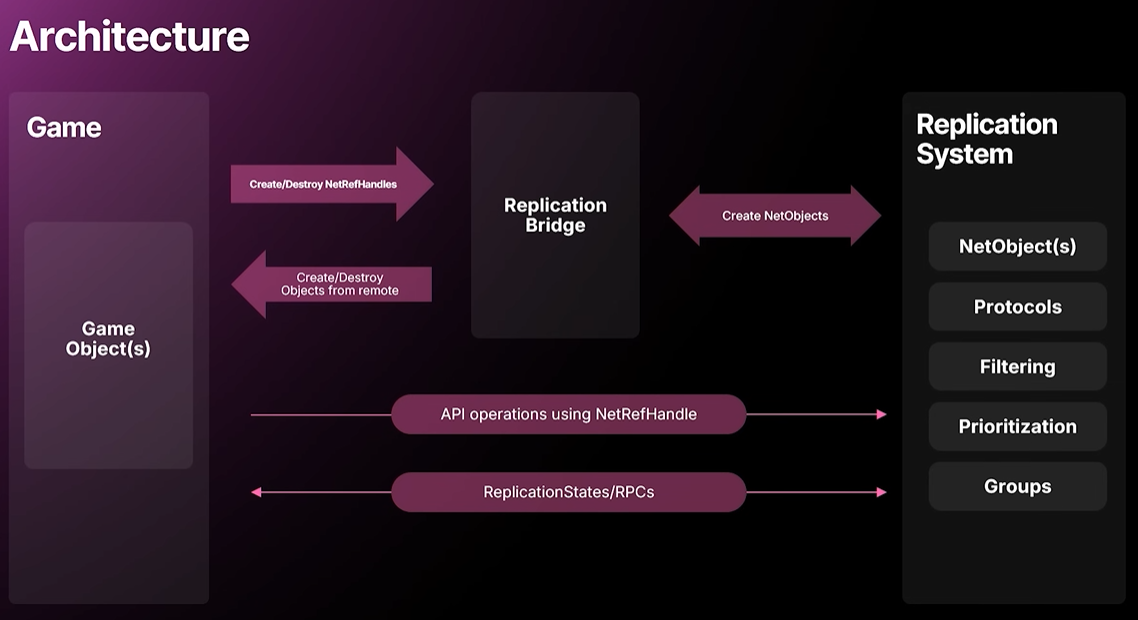
So what does it mean in practice? on one side we have the replication system, On the other side we have game objects. but no access to objects in the replication system. You say how do we do it? we have the replication bridge which you interact with when starting and stopping replication of an object. when you start replicating an object you'll get a NetRef Handle back and that you can use in the replication system API which is a facade style API forwarding calls to internal systems like filtering and prioritization.
그렇다면 실제로는 어떤 의미일까요? 한쪽에는 리플리케이션 시스템이 있고, 다른 한쪽에는 게임 오브젝트가 있습니다. 하지만 리플리케이션 시스템 내의 오브젝트에는 접근할 수 없습니다. 어떻게 해야 할까요? 오브젝트 리플리케이션을 시작하거나 중지할 때 상호작용하는 Replication Bridge가 있습니다. 오브젝트 리플리케이션을 시작하면 NetRefHandle을 반환받고, 이를 리플리케이션 시스템 API에서 사용할 수 있습니다. 이 API는 Filtering 및 Prioritization과 같은 내부 시스템으로 호출을 전달하는 파사드 스타일 API입니다.
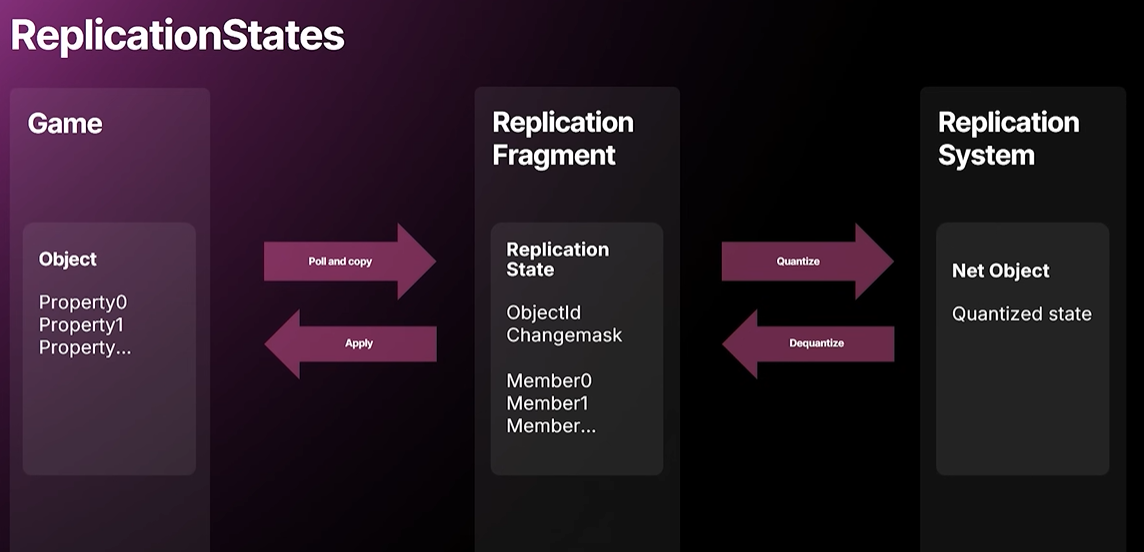
On the receiving end we can create and destroy game objects as well. When it comes to marshalling the game data to the replication system, we have something we call Replication States and coupled with a Replication Fragment which is an instance per game object. it's slightly more complicated but we can think of it like that. we can use the property reflection to copy data to and from the source and target data as well as perform relevant network callbacks like OnReps.
And the Replication state has a memory buffer described by a Replication State Descriptor which contains offsets conditionals traits and how to serialize a member.
And as you hear there's an extra copy of the source state data so that we can detect which properties have been dirtied or updated. There's a lot that we can improve here. if the game object side had a typed property replication fragment or typed replication fragment, we could instead of performing OnReps and use the property reflection with virtual function calls, we could call a native apply when we receive data where you get all the state and you can perform your game logic in arbitrary order and do native member compares if necessary.
수신 측에서는 게임 오브젝트를 생성하고 파괴할 수 있습니다. 게임 데이터를 리플리케이션 시스템으로 마샬링할 때는 리플리케이션 스테이트(Replication States)라는 것을 사용하는데, 이는 게임 오브젝트당 인스턴스인 리플리케이션 프래그먼트(Replication Fragment)와 결합됩니다. 약간 더 복잡하지만, 이렇게 생각해 볼 수 있습니다. 프로퍼티 리플렉션을 사용하여 소스 및 타겟 데이터 간에 데이터를 복사하고 OnReps와 같은 관련 네트워크 콜백을 수행할 수 있습니다. Replication State에는 오프셋, 조건문, 특성, 멤버 직렬화 방법을 포함하는 리플리케이션 스테이트 디스크립터(Replication State Descriptor)로 설명되는 메모리 버퍼가 있습니다. 그리고 들으셨듯이, 어떤 프로퍼티가 변경되었거나 업데이트되었는지 감지할 수 있도록 소스 상태 데이터의 추가 사본이 있습니다. 여기서 개선할 부분이 많습니다. 게임 오브젝트 측에 Typed Property Replication Fragment 또는 Typed Replication Fragment가 있는 경우 OnReps를 수행하고 가상 함수 호출과 함께 프로퍼티 리플렉션을 사용하는 대신 데이터를 수신할 때 기본 적용을 호출하여 모든 상태를 가져오고 임의의 순서로 게임 로직을 수행하고 필요한 경우 네이티브 멤버 비교를 수행할 수 있습니다.
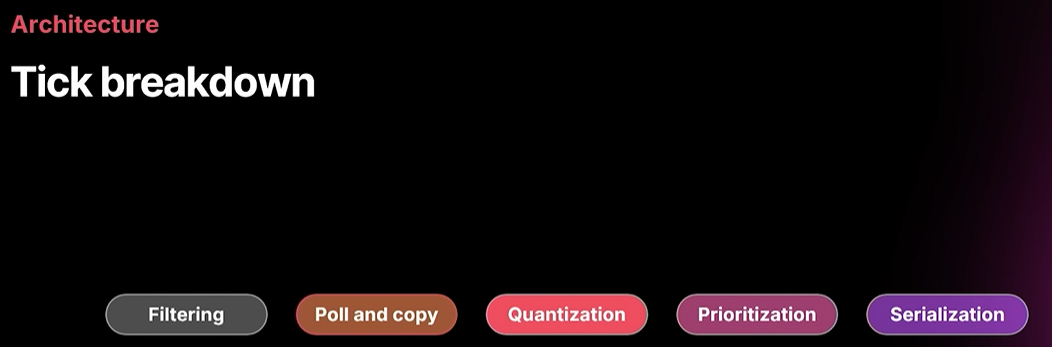
looking how our net update looks. there are five main steps involved in the replication. It's Filtering, Poll and Copy, Quantization, Prioritization, and Serialization.
Net Update가 어떻게 보이는지 살펴보겠습니다. Iris에는 5개의 주요 스텝이 존재합니다. Filtering, Poll and Copy, Quantization, Prioritization, 그리고 Serialization입니다.
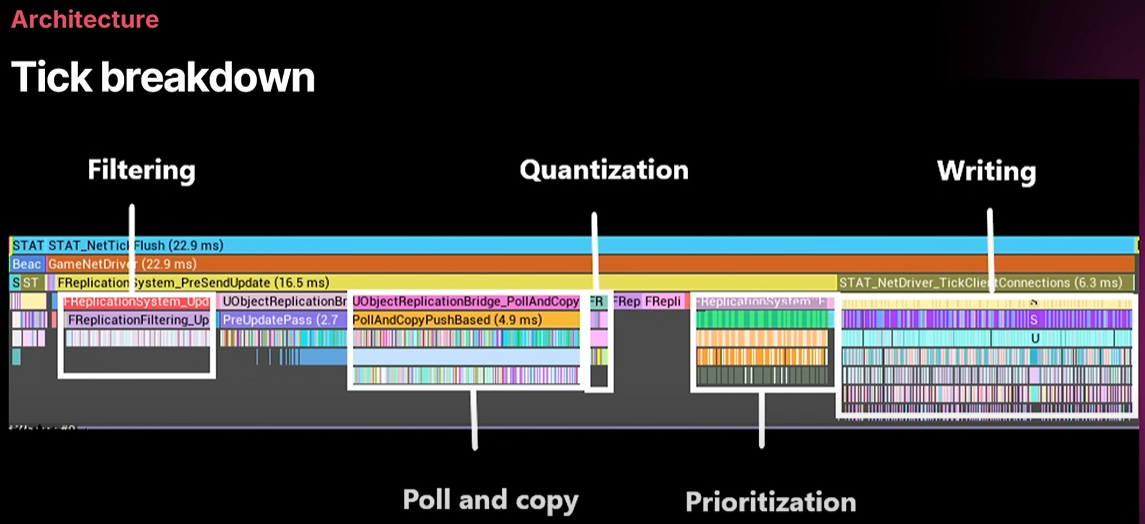
And we look at how this looks in timing insights. It's a great tool. I hope you use it. we can see that we're performing all work at once for each of these steps. So the Filtering produces a list of objects relevant to a connection and when we know all connections requirements we continue with the Poll and Copy phase and we only need to check any objects that are relevant to any connection.
The Quantization is where we transform the source data into a plain old data format that is fast to serialize during the serialization phase. there you can perform expensive transformations like transforming FString to UTF8 for example. This is only done once per object. So anything you do there you don't have to do during serialization time and Prioritization is responsible for producing a list of which objects are more important to replicate.
And finally when we serialize everything it will use that list and we'll see what ends up in the packet. Usually there's too much that you want to replicate. So that's why we need a prioritization.
타이밍 인사이트에서 이것이 어떻게 보이는지 살펴보겠습니다. 훌륭한 도구입니다. 여러분도 활용해 보시기 바랍니다. 각 단계에서 모든 작업을 동시에 수행하고 있음을 알 수 있습니다. 필터링은 커넥션과 관련된 오브젝트 목록을 생성하고, 모든 커넥션 요구 사항을 파악하면 Poll and Copy 단계로 넘어가 모든 커넥션과 관련된 오브젝트만 확인하면 됩니다. Quantization은 소스 데이터를 직렬화 단계에서 빠르게 직렬화할 수 있는 일반 데이터 형식으로 변환하는 단계입니다. 예를 들어 FString을 UTF8로 변환하는 것과 같은 비용이 많이 드는 변환을 수행할 수 있습니다. 이 작업은 객체당 한 번만 수행됩니다. 따라서 이 단계에서 수행하는 모든 작업은 직렬화 중에 수행할 필요가 없으며, Prioritization은 리플리케이션이 더 중요한 오브젝트 목록을 생성하는 역할을 합니다. 마지막으로 모든 것을 직렬화할 때 해당 목록을 사용하여 패킷에 무엇이 포함되는지 확인합니다. 일반적으로 리플리케이트하려는 객체가 너무 많습니다. 그래서 Prioritization이 필요한 것입니다.


So where do you come in? What do you implement in in this pipeline? Filtering of course. there are various reasons for doing it. Level Streaming is a big one. If you can't instantiate the object on the receiving side, there's no point in sending it in the first place. And of often you want to replicate something just to one or more a few connections like the player controller is only replicated to its owning connection. And finally, as an optimization to save server and client performance and also client memory. and here's the where you can do for example spatial filtering.
또.. 여긴 어느 단계로 들어온 것일까요? 이 파이프라인에선 무엇을 구현해야 할까요? 물론 필터링입니다. 필터링을 하는 데에는 여러 가지 이유가 있습니다. 레벨 스트리밍이 대표적인 예입니다. 수신 측에서 객체를 인스턴스화할 수 없다면 애초에 전송할 필요가 없습니다. 그리고 Player Controller가 자기 자신의 커넥션에만 리플리케이트되는 것처럼, 하나 이상의 커넥션에만 무언가를 리플리케이트하려는 경우가 많습니다. 마지막으로, 서버와 클라이언트 성능, 그리고 클라이언트 메모리를 절약하기 위한 최적화가 있습니다. 예를 들어 Spatial Filtering을 할 수 있는 곳이 바로 여기입니다.
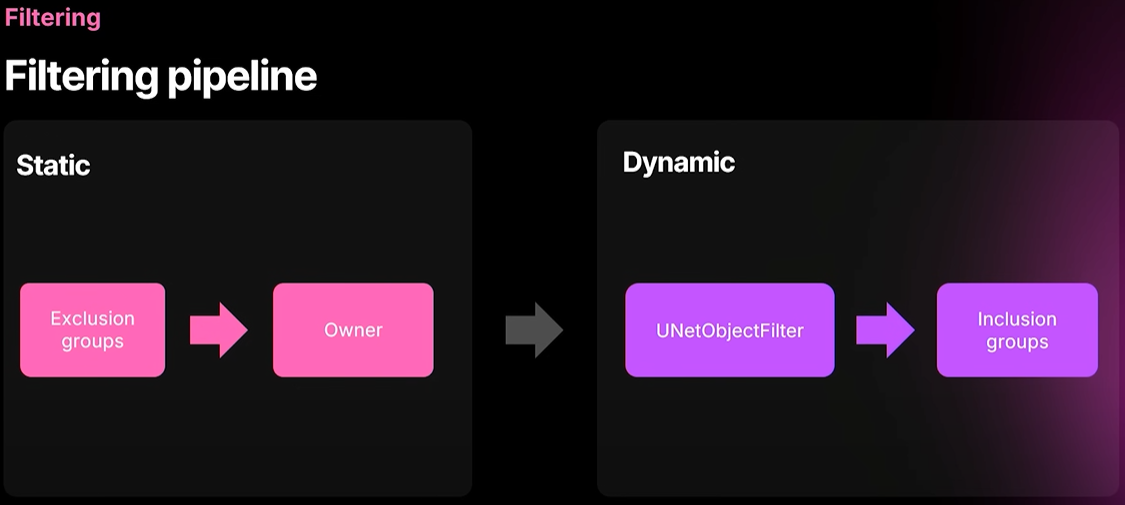
So we have two different kinds of filtering. one is static which cannot be overridden and one is dynamic implemented through NetOobjectFilters and that's typically where you come in. And if you filter out something in a NetObjectFilter, it can be overridden by inclusion groups. And this is a useful thing for example for spectator logic and things like that when you want something replicated to an extra connection or something.
exclusion groups you create a group through the replication system API. you add a few objects and which connections are allowed or disallowed to have them replicated and we catch the any modifications you do each frame. So if you're not doing anything a frame that saves time during the filtering phase and only owner filtering that's the regular bOnlyRelevant ToOwner thing you find on the actor but if you're not using actors you can use this filter by code.
So NetObjectFilters, yep it's called every frame for every object assigned to that filter. So it can be expensive. usually you want to try to implement things through exclusion and inclusion groups instead.
And finally inclusion groups. It's almost the same API in the replication system but it can override the NetObjectFilter if the NetObjectFilter disallowed replication. Hence inclusion group it cannot do anything other than enabling replication of an object to one or more connections.
두 가지 타입의 필터링이 있습니다. 하나는 오버라이드할 수 없는 Static Filtering이고, 다른 하나는 NetOobjectFilters를 통해 구현되는 Dynamic Filtering입니다. 일반적으로 이 필터링이 사용됩니다. NetObjectFilter에서 필터링을 제거하면 포함 그룹(Inclusion Group)으로 오버라이드할 수 있습니다. 이는 예를 들어 관전자 로직과 같은 경우에 유용합니다. 추가적인 커넥션에게 리플리케이트하려는 항목이 있을 때 유용합니다. 제외 그룹(Exclusion Group)은 Replication System API를 통해 그룹을 만듭니다. 몇 개의 오브젝트와 리플리케이션 허용 또는 거부할 커넥션을 추가하면 각 프레임에서 발생하는 수정 사항을 감지합니다. 따라서 액터에서 찾을 수 있는 이전의 bOnlyRelevantToOwner랑 보통 비슷한데, 필터링 단계에서 Owner Filtering만 수행하면 해당 프레임의 필터링 단계에서 아무런 작업도 하기 때문에 시간을 절약할 수 있습니다. 하지만 액터를 사용하지 않는 경우 코드별 필터링을 사용할 수 있습니다. NetObjectFilters는 해당 필터에 할당된 모든 오브젝트에 대해 매 프레임마다 호출됩니다. 따라서 비용이 많이 들 수 있습니다. 따라서 Exclusion Group과 Inclusion Group을 통해 구현하려고 하는 것이 일반적입니다. 마지막으로 포함 그룹입니다. 리플리케이션 시스템에서는 거의 동일한 API이지만, NetObjectFilter가 리플리케이션을 허용하지 않는 경우 NetObjectFilter를 오버라이드할 수 있습니다. 따라서 Inclusion Group에서는 하나 이상의 커넥션에 대한 오브젝트 리플리케이션를 활성화하는 것 외에는 다른 작업을 수행할 수 없습니다.
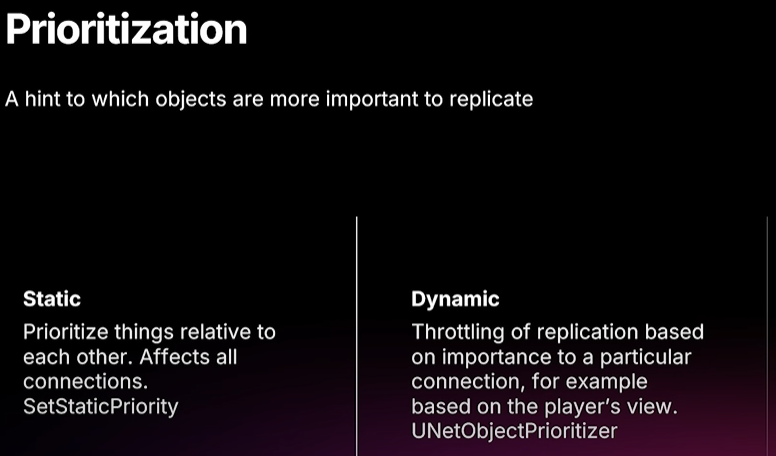
There's also dependent actors which isn't filtering but those can also override the net object filters. And prioritization. we don't use the NetUpdateFrequency to prioritize or throttle replication. instead we use prioritization. so the NetUpdateFrequency that controls how often we pull your object and check for dirty properties whereas prioritization will dictate when something is replicated or not. So priorities are accumulated until the object is replicated and then it's reset. and a priority of one means we're allowed to replicate it. So you can that's how you use it as a replication frequency throttling by having a priority less than one and that's quite common for example for spatial prioritization and you implement that through a net object prioritizer. Of course, we have a few useful ones in the engine already but you can implement your own as well.
필터링하지 않지만 NetObjectFilter를 오버라이드할 수 있는 Dependent Actor라는 것도 있습니다.그리고 Priorization. 우리는 리플리케이션의 우선순위를 지정하거나 제한하기 위해 NetUpdateFrequency를 사용하지 않습니다. 대신 Prioritization을 사용합니다. 즉, NetUpdateFrequency는 오브젝트를 끌어오고 더티 프로퍼티를 확인하는 빈도를 제어하는 반면 우선순위 지정은 무언가를 리플리케이트할지 여부를 결정합니다.따라서 Prioritize는 객체가 리플리케이트될 때까지 누적된 다음 리셋됩니다. 그리고 Priority가 의미하는 바는 리플리케이트가 허용된다는 것입니다. 이것은 Priority를 1보다 작게 하여 replication frequency 를 제한하는 방법입니다.예를 들어 Spatial Prioritization의 경우 매우 일반적이며 NetObjectPrioritizer를 통해 구현합니다.물론 엔진에 이미 몇 가지 유용한 것이 있지만 직접 구현할 수도 있습니다.
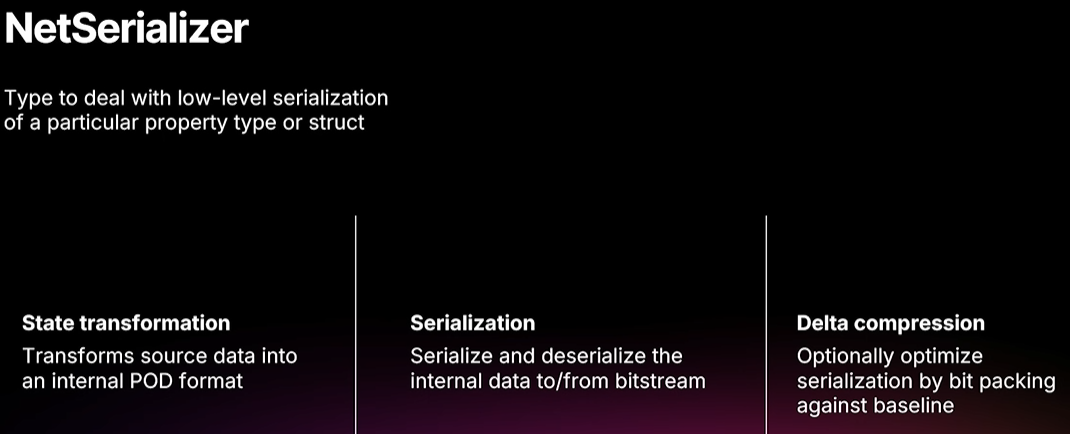
And finally, serialization. That's slightly different from what you're used to. for example, we don't support NetSerialize on structs. you have to implement well not have to but often you need to implement a net serializer instead and that deals with a particular property type or struct but since we support all properties that is supported by any other replication system in the engine you'll mostly deal with the structs. and as I mentioned before it is responsible for transforming source data into a native network format that is plain old data format that is effective to serialize to bitstream and you can also optionally implement delta compression, it's bit packing against the known baseline and can save a lot of bandwidth depending on what kind of types you have and we implement it for for a lot of primitive types and Quantized FVectors and such.
마지막으로 직렬화입니다. 이는 익숙한 것과 약간 다릅니다. 예를 들어 구조체에서는 NetSerialize를 지원하지 않습니다. 잘 구현해야 하지만, 꼭 그럴 필요는 없고, 대신 특정 프로퍼티 타입이나 구조체를 처리하는 Net Serializer를 구현해야 하는 경우가 많습니다. 하지만 엔진의 다른 리플리케이션 시스템에서 지원하는 모든 프로퍼티를 지원하기 때문에 대부분 구조체를 처리하게 됩니다. 앞서 언급했듯이 소스 데이터를 BitStream으로 직렬화하는 데 효과적인 일반 데이터 형식인 기본 네트워크 형식으로 변환하는 역할을 합니다. 또한 Delta Compression을 구현할 수도 있습니다. 알려진 기준치에 대한 비트 패킹으로, 사용하는 타입에 따라 대역폭을 크게 절약할 수 있습니다. 많은 원시 타입과 양자화된 FVector 등에 대해 이를 구현합니다.
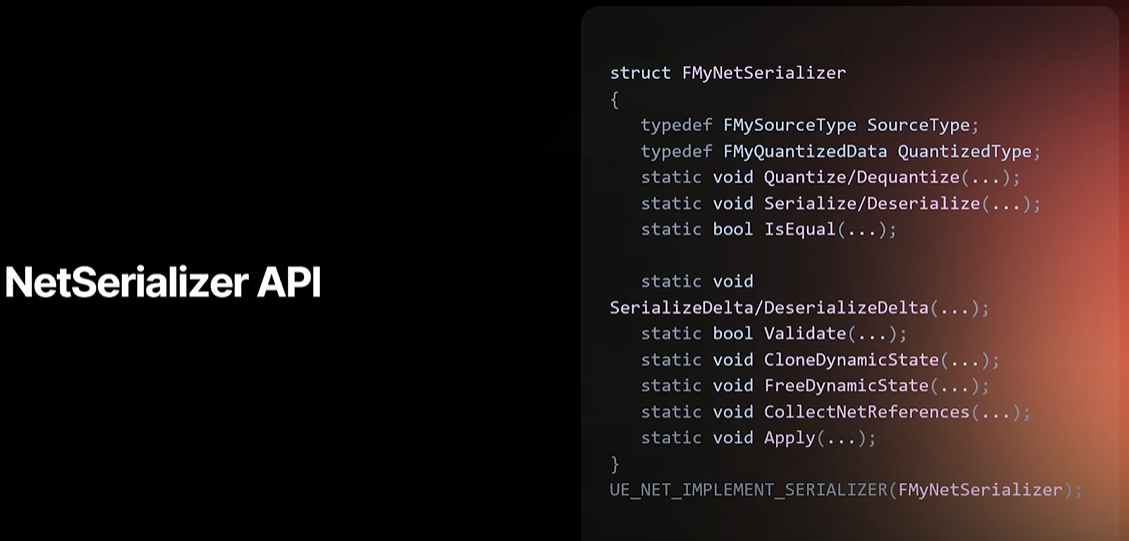
And here's the only code slide I'll show today. the net serializer API. It may look a bit daunting. for a primitive type it it's not that much you would have to implement. then it's just a type def of the source type and serialize and Deserialize.
But since you will be porting structs to this you may implement may need to implement a few more of these functions.
Quantize/Dequantize that's transforming from the source state to the network format is equal to determine if either two source instances are equal or two quantized instances are equal. SerializeDelta/DeserializeDelta that's for the delta compression and completely optional, Validate is something we don't call yet but you should still implemented we may start using it for RPCs to validate the parameters that they contain values that you expect. So for example, if you if you receive an invalid enum value, we would say that validation failed and we wouldn't call the RPC. clone and free dynamic state that is in the case if you have dynamic memory allocations in your pod data. since we need to clone and free baselines, these are needed and collect net references. If if you have object pointers and such, we need to be able to call OnReps when they're finally resolvable on the receiving end. And apply is if you need a bit of a custom application from from the dequantized data to the target instance. We always dequantize to a temporary instance. So if you don't want to overwrite something that is a replicated property, you may want to implement apply.
오늘 보여드릴 유일한 코드 슬라이드는 바로 Net Serializer API입니다. 다소 어려워 보일 수 있지만, 원시 타입의 경우 구현해야 할 부분이 많지 않습니다. 소스 타입의 타입 정의와 직렬화, 역직렬화만 하면 됩니다. 하지만 구조체를 이 API로 이식할 예정이므로, 몇 가지 함수를 더 구현해야 할 수도 있습니다. 소스 상태에서 네트워크 형식으로 변환하는 Quantize/Dequantize는 두 소스 인스턴스가 같은지 또는 두 양자화된 인스턴스가 같은지 판별합니다. 델타 압축을 위한 SerializeDelta/DeserializeDelta는 완전히 선택 사항입니다. Validate는 아직 호출하지 않지만 구현해야 합니다. RPC가 매개변수에 예상한 값이 포함되어 있는지 검증하는 데 사용할 수 있습니다. 예를 들어, 잘못된 Enum 값을 수신하면 Validation이 실패했다고 보고 RPC를 호출하지 않습니다. Pod(Plain Old Data)에 동적 메모리 할당이 있는 경우, 동적 상태를 리플리케이트하고 해제합니다. 기준선을 리플리케이트하고 해제해야 하므로, 이러한 기준선이 필요하고 Net Reference를 수집합니다. 오브젝트 포인터 등이 있는 경우, 수신 측에서 최종적으로 확인 가능할 때 OnReps를 호출할 수 있어야 합니다. 그리고 apply는 역양자화된 데이터에서 대상 인스턴스로의 커스텀 적용이 필요한 경우입니다. 우리는 항상 임시 인스턴스로 역양자화를 수행합니다. 따라서 Replicated Property을 덮어쓰고 싶지 않다면 apply를 구현하는 것이 좋습니다.
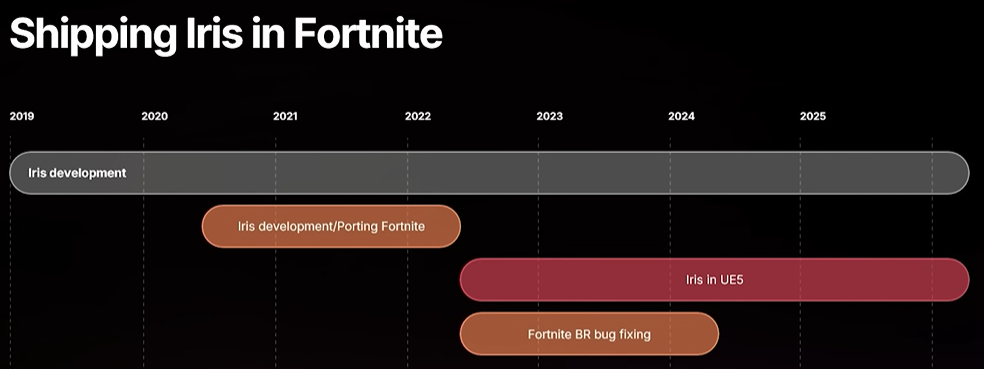
So let's go over to porting and the lessons we learned while porting Fortnite to Iris. So we started the Iris development in 2019. and the first things I did was implement after picking the name of course. implementing it a test framework so we could test everything because we predicted being having to switch replication systems, live and also rewrite or implement a new bitstream that was more efficient than the existing one.
So me and Mattias, we worked for about a year in the cave and it started to look promising. so we went and started trying to port Fortnite. and we struggled for two years. it was hard for just two people to catch up with all the Fortnite development and there were also some major refactorings going on of systems that we had you know already fixed and now we had to reimplement them. But after those two years, we felt okay, it's not too buggy. maybe we can seriously think about shipping it for real. And that's when we moved to UE5 main branch, released Iris experimental in 5.1. we got some more devs to help out and also QA. but it took almost two years but we shipped Iris in Fortnite in April last year. we didn't announce it. We just switched the button.
포트나이트를 Iris로 포팅하면서 얻은 교훈과 포팅에 대해 이야기해 보겠습니다. 2019년에 Iris 개발을 시작했습니다. 물론 이름을 정하고 나서 가장 먼저 한 일은 구현이었습니다. 리플리케이션 시스템을 스위칭하고, 라이브로 전환하고, 기존 비트스트림보다 효율적인 새로운 비트스트림을 다시 작성하거나 구현해야 할 것으로 예상했기 때문에 모든 것을 테스트할 수 있도록 테스트 프레임워크를 구현했습니다. 저와 Mattias는 약 1년 동안 동굴에서 작업했고, 그 결과가 좋아 보이기 시작했습니다. 그래서 포트나이트 포팅을 시도하기 시작했습니다. 그리고 2년 동안 고군분투했습니다. 단 두 사람이 포트나이트 개발 현황을 따라잡는 것도 어려웠고, 이미 수정된 시스템을 대대적으로 리팩토링해야 했기에 다시 구현해야 했습니다. 하지만 2년이 지난 후, 버그가 심하지 않다는 것을 알게 되었습니다. 어쩌면 정식 출시를 진지하게 고려해 볼 수도 있을 것 같습니다. 그렇게 UE5 메인 브랜치로 옮겨서 5.1 버전에서 아이리스 실험 버전을 출시했습니다. 개발자들이 더 많이 참여했고, QA도 맡았습니다. 거의 2년이 걸렸지만, 작년 4월에 포트나이트에 Iris를 적용(Shipped)했습니다. 발표는 하지 않았고, 버튼만 스위칭했을 뿐입니다. (: UE_WITH_IRIS)

So a lot of the work well not a lot of the work some of the work was as I mentioned we don't support NetSerialize you'll get a warning if we encounter struct with net serialize that is used in replication and then you can take a look if you need a custom serializer or not. in Iris structs are replicated atomically but they weren't previously. So one of the reasons to implement net serialize was to get that atomicity. so you just need to mark up your properties correctly. so in structs that means mark properties as not replicated if they're not replicated and have them as UPROPERTY if your net serialized method access a member.
conditionals is quite common. Rep movement is an example where whether you replicate physics or not, you replicate angular velocity or not. and to mimic that you need to implement an serializer.
and there can be other bandwidth optimizations like custom quantization. we encountered cases where we actually had higher precision in the struct but that led to gameplay bugs. so for bit perfect compatibility reasons you may need to implement the net serializer in that case as well. But I mentioned we want you to get up and running as quickly as possible. So there is a quick hack you can use the macro.
UE_NET_IMPLEMENT_NAMED_STRUCT_LASTRESORT_NETSERIALIZER_AND_REGISTRY_DELEGATES(MyStructName). I hope that scares you off. use it as a last resort. But of course, for debugging struct debug type structs, you can leave it, but you're not getting any of the benefits of Iris and we shoehorn your serialization into Iris. you won't see in the network insights or anything what you're actually replicating in there. so but it's there.
그래서 많은 작업이 필요했지만, 많은 작업은 아니었습니다. 일부 작업은 제가 언급했듯이 NetSerialize를 지원하지 않습니다. 리플리케이션에 사용되는 NetSerialize 구조체를 만나면 경고가 표시되고, Custom Serializer가 필요한지 여부를 확인할 수 있습니다. Iris에서는 구조체가 원자적으로 리플리케이트되지만 이전에는 그렇지 않았습니다. NetSerialize를 구현하는 이유 중 하나는 Atomicity을 확보하기 위한 것이었습니다. 따라서 프로퍼티를 올바르게 표시하기만 하면 됩니다. NetSerialize된 메서드가 멤버에 액세스하는 경우 구조체에서는 리플리케이트되지 않는 프로퍼티를 UPROPERTY()에서 리플리케이트되지 않음으로 표시하면 됩니다. 조건문은 매우 일반적입니다. Rep Movement는 물리 법칙을 리플리케이트하든 하지 않든 각속도를 리플리케이트하든 하지 않든 리플리케이트하는 예입니다. 이를 모방하려면 NetSerializer를 구현해야 합니다. 그리고 Custom Quantization과 같은 다른 대역폭 최적화도 있을 수 있습니다. 구조체에서 실제로 더 높은 정밀도를 구현했지만 게임플레이 버그로 이어진 사례도 있었습니다. 따라서 완벽한 호환성을 위해 이 경우에도 NetSerializer를 구현해야 할 수 있습니다. 하지만 최대한 빨리 시작하고 실행하도록 도와드리고 싶다고 말씀드렸습니다. 그래서 매크로를 사용할 수 있는 간단한 방법이 있습니다. UE_NET_IMPLEMENT_NAMED_STRUCT_LASTRESORT_NETSERIALIZER_AND_REGISTRY_DELEGATES(MyStructName). 무섭죠? 이 부분이 걱정되신다면 최후의 수단으로 사용하세요. 물론, 구조체 디버깅 타입의 구조체를 디버깅하는 경우에는 그대로 둘 수 있지만, Iris의 이점을 누릴 수 없으며, 직렬화를 Iris에 억지로 집어넣었습니다. 네트워크 인사이트나 실제로 리플리케이트하는 내용을 볼 수는 없습니다. 하지만 이미 존재합니다.
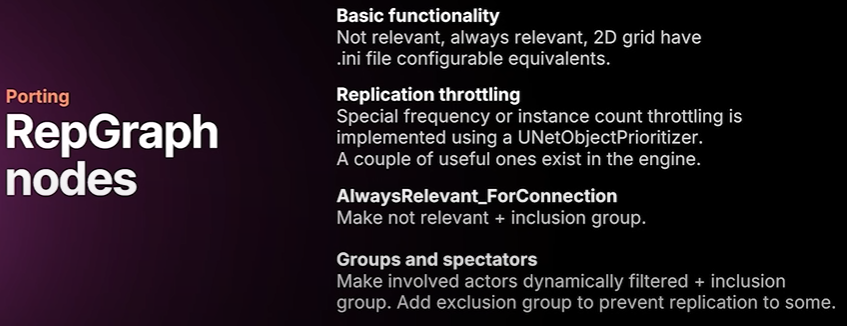
the Fortnite was using rep graph and we have some equivalents for the basic functionality. So you basically only have to tag which classes should use being relevant, never relevant or use 2D spatial filter. Sometimes there was replication throttling going on and as I mentioned that's the job of the priority system. And so we implemented a few net object prioritizers that were useful for rep graph and all of those are in iris or engine code. For always relevant for connection. you can make something not relevant using the ini configurable configuration and add an inclusion group. For groups and spectators. There can be a combination of dynamic filtering inclusion groups and perhaps exclusion groups.
포트나이트는 Replication Graph를 사용했었고, 저희는 기본 기능에 대한 몇 가지 동등한 기능을 가지고 있습니다. 따라서 어떤 클래스가 관련성(being relevant)을 사용해야 하는지, 관련성이 전혀 없는지, 또는 2D 공간 필터를 사용해야 하는지에 대한 태그만 지정하면 됩니다. 때때로 리플리케이션 쓰로틀링(replication throttling)이 발생했는데, 앞서 언급했듯이 이는 Prioritizer의 역할입니다. 그래서 Rep Graph에 유용한 몇 가지 Net Object Prioritizer를 구현했는데, 이 모든 것은 iris 또는 엔진 코드에 있습니다. AlwaysRelevantForConnection의 경우, ini Config를 사용하여 Not Relevant를 만들고 Inclusion Group을 추가할 수 있습니다. 그룹 및 관전자의 경우, Dynamic Filtering - inclusion group과 Exclusion group을 조합할 수 있습니다.
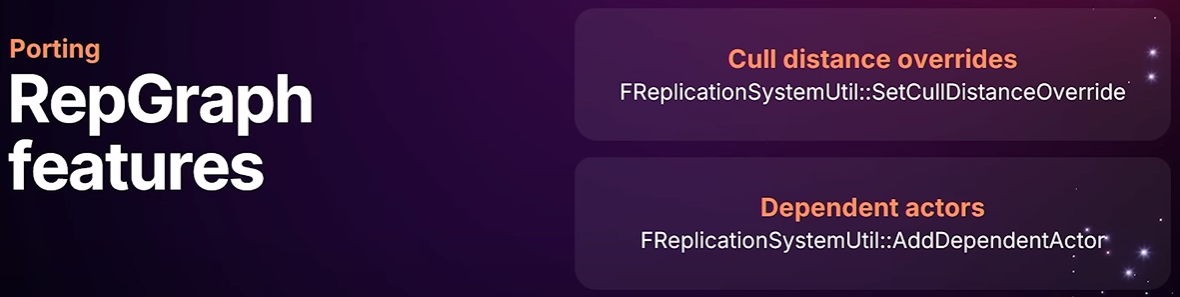
Rep graph also has a couple of features. I'm not sure how much they're used, but you can override CullDistances and the add dependent actors and that's something we support through replication system util.
Replication Graph에도 몇 가지 기능이 있습니다. 얼마나 자주 사용되는지는 모르겠지만, CullDistances를 오버라이드하고 Dependent Actor를 추가할 수 있으며, 이는 FReplicationSystemUtill::을 통해 지원됩니다.
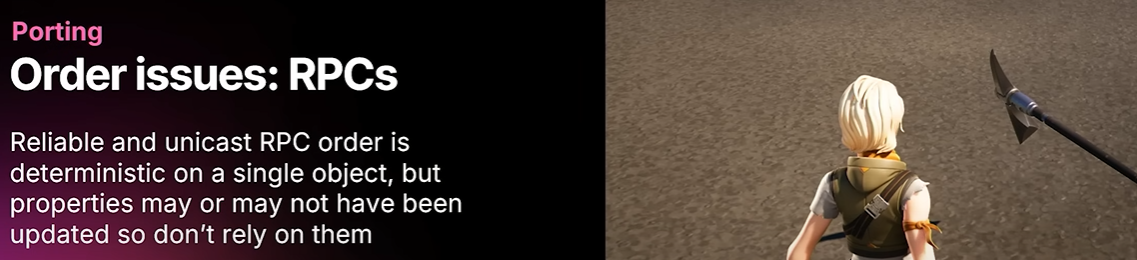
Now we encountered lots of bugs during the porting and many of them were related to different types of ordering issues.
And one is RPCs relying on replicated properties that were not updated for one or other reason.
Even if you update the property and send an RPC in the same frame on the server side, it doesn't mean they end up in the same packet or will be received on the same frame on the client side. And if you have pointers to objects or anything else, they may require a sync loading or an actor to be replicated. So you never know when those are going to be updated really. another issue with properties is that you can't really rely on OnRep order for the similar reasons as RPC couldn't rely on properties. a sync loading and objects that haven't been replicated.
포팅 과정에서 많은 버그를 발견했는데, 그중 다수는 다양한 유형의 순서 문제(ordering issue)와 관련이 있었습니다. 그중 하나는 RPC가 어떤 이유로든 업데이트되지 않은 Replicated Properties에 의존하는 것입니다. 서버 측에서 프로퍼티를 업데이트하고 동일한 프레임에서 RPC를 전송한다고 해서 동일한 패킷에 포함되거나 클라이언트 측에서 동일한 프레임으로 수신된다는 의미는 아닙니다. 또한 객체나 다른 객체에 대한 포인터가 있는 경우, Sync Loading이나 액터 리플리케이션이 필요할 수 있습니다. 따라서 이러한 오브젝트가 실제로 언제 업데이트될지 알 수 없습니다. 프로퍼티와 관련된 또 다른 문제는 RPC가 프로퍼티를 신뢰할 수 없었던 것과 비슷한 이유로 OnRep 순서를 신뢰할 수 없다는 것입니다. Sync Loading과 리플리케이트되지 않은 오브젝트가 그 예입니다.
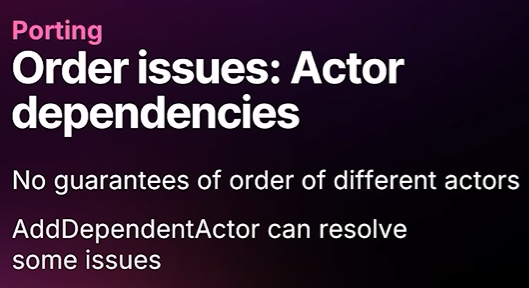
And finally, actor dependencies don't rely on an actor being replicated before or after another actor. Even with add dependent actor all you know is it will be replicated basically and there's also a combination of all of these three.
마지막으로, Actor Dependencies는 한 액터가 다른 액터의 이전이나 이후에 리플리케이트되는 것에 의존하지 않습니다. Dependent Actor를 추가하더라도 기본적으로 리플리케이트된다는 사실만 알 수 있으며, 이 세 가지가 모두 결합된 경우도 있습니다.
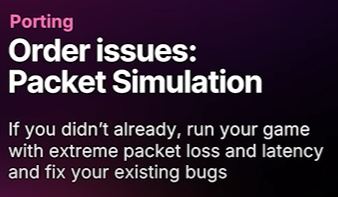
One thing you can do prior to porting is run your game with packet simulation with high latency and high packet loss. Don't be shy of using 10 20% packet loss when testing. I'm sure you'll find a lot of bugs using those tools. So, that's available in the engine. I think it's on by default in the editor actually, but I may be wrong there. Use it in your play tests and when you're testing yourself.
포팅하기 전에 할 수 있는 한 가지 방법은 높은 지연 시간과 높은 패킷 손실을 고려하여 패킷 시뮬레이션을 실행하는 것입니다. 테스트할 때는 10%에서 20% 사이의 패킷 손실을 사용하는 것을 주저하지 마세요. 이러한 도구를 사용하면 많은 버그를 발견할 수 있을 것입니다. 엔진에서 이 기능을 사용할 수 있습니다. 에디터에서는 기본적으로 켜져 있는 것 같은데, 제가 틀렸을 수도 있습니다. 플레이 테스트나 직접 테스트할 때 이 기능을 사용해 보세요.
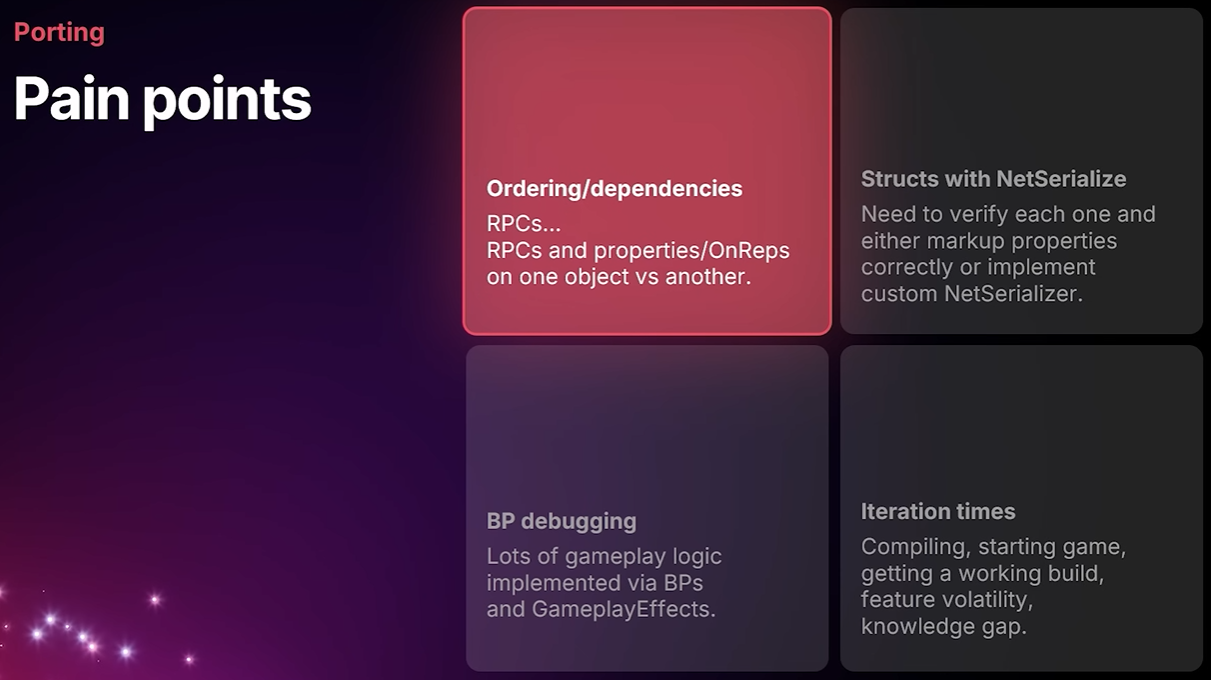
So, some of the pain points ordering issues lots of pain, structs with net serialize had to go through each and every one of them. since we have actually implemented a feature for example if you have a struct with a base struct and a bunch of inherited structs you don't need to implement net serialize if you're only adding some replicated properties and that's unlike net serialize where you would have to make sure you call the parent net serialize is you only need the net serializer where it's actually needed.
Blueprint debugging. yeah, it wasn't fun because we basically didn't know the game and we didn't know how the blueprints worked and it's generally just painful debugging those. and sometimes you would be required to load up the whole level and you didn't know which blueprint it was involved at all.
Iteration times, we had lots of problem with that. even if we had a green build, it didn't mean that we could find or test what we were looking for that particular day. with Fortnite, the level changes all the time and a new release comes out every two weeks. and maybe we didn't have time to look at that until two months later and then you couldn't look at it because it was gone and we didn't know what we were looking for in the first place.
그래서, 몇몇 골치 아픈 문제, 즉 순서 문제가 정말 많았고, NetSerialize를 사용하는 구조체는 모든 문제를 하나하나 다 겪어야 했습니다. 예를 들어, 실제로 기능을 구현했기 때문에 기본 구조체와 많은 상속된 구조체가 있는 경우, replicated property만 추가할 때NetSerialize를 구현할 필요가 없습니다. 이는 부모 NetSerialize를 호출해야 하는 NetSerialize와는 달리, 실제로 필요한 경우에만 Net Serializer가 필요합니다. 블루프린트 디버깅. 네, 재미없었습니다. 기본적으로 게임에 대해 잘 몰랐고 블루프린트가 어떻게 작동하는지도 몰랐기 때문입니다. 일반적으로 디버깅하는 것은 정말 고통스러웠습니다. 때로는 전체 레벨을 로드해야 했는데 어떤 블루프린트가 관련되어 있는지 전혀 몰랐습니다. Iteration Time에도 많은 문제가 있었습니다. 그린 빌드를 사용하더라도 특정 날짜에 원하는 것을 찾거나 테스트할 수 있다는 의미는 아니었습니다. 포트나이트의 경우 레벨이 항상 바뀌고 2주마다 새로운 릴리스가 나옵니다. 그리고 아마도 우리는 2개월 후에야 그것을 살펴볼 시간이 있었고, 그 후에는 그것이 사라져서 볼 수 없었고, 우리는 처음부터 무엇을 찾고 있는지도 몰랐습니다.
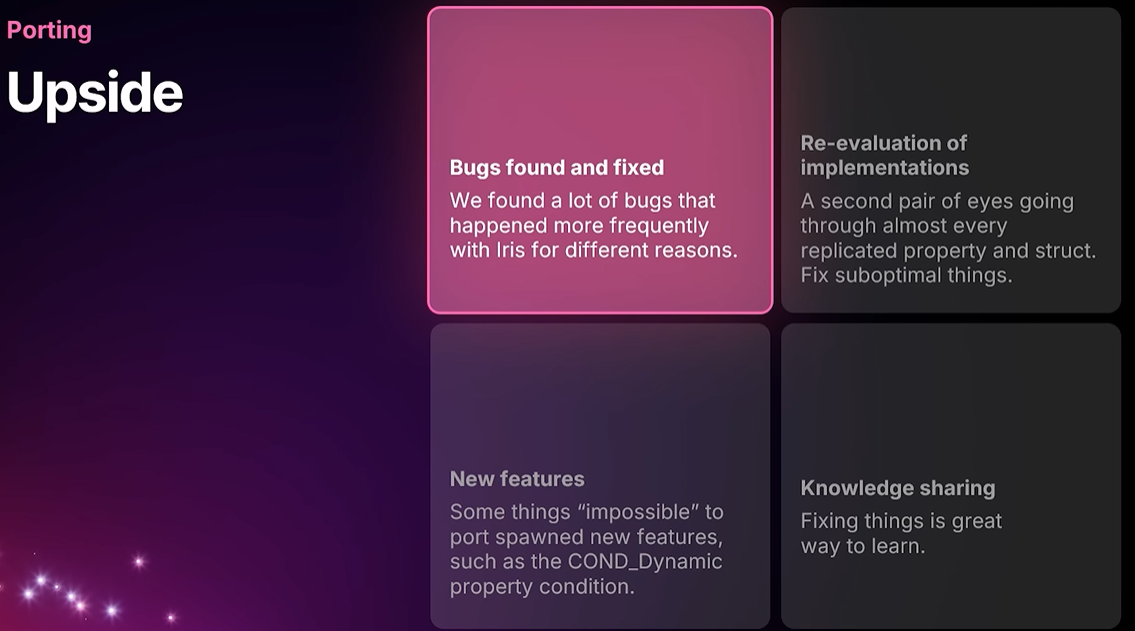
And on the up side of things, we fixed a lot of bugs thanks to uh tools like the package simulation. we went through pretty much every aspect of replication in the game. We could fix suboptimal things. We encountered some things that were
impossible or very hard to implement. the no object access thing could sometimes be a hurdle but could also spawn a new feature like the new lifetime condition dynamic which allows you to change the lifetime condition of a property at runtime and that works for Iris and non-iris. fixing things is a great way to learn both us as network programmers learning how game play certain gameplay features work but also At the end of the porting effort when other developers started pitching in they learned Iris.
긍정적인 측면으로는, 패키지 시뮬레이션 같은 도구 덕분에 많은 버그를 수정했습니다. 게임 내 리플리케이션의 거의 모든 측면을 검토했죠. 최적화되지 않은 부분도 수정할 수 있었고, 구현이 불가능하거나 매우 어려웠던 부분도 있었습니다. 오브젝트 접근 금지 (No Object Access)는 때로는 난관이 될 수 있지만, 런타임에 프로퍼티의 LifetimeCondition을 변경할 수 있는 새로운 수명 조건 동적 기능과 같은 새로운 기능을 만들어낼 수도 있었습니다. 이 기능은 Iris와 non-Iris 모두에서 작동합니다. 문제를 수정하는 것은 네트워크 프로그래머로서 게임 플레이 방식, 특정 게임플레이 기능의 작동 방식을 배우는 좋은 방법일 뿐만 아니라, 포팅 작업이 끝나고 다른 개발자들이 참여하기 시작하면서 Iris를 배우는 데에도 도움이 됩니다.
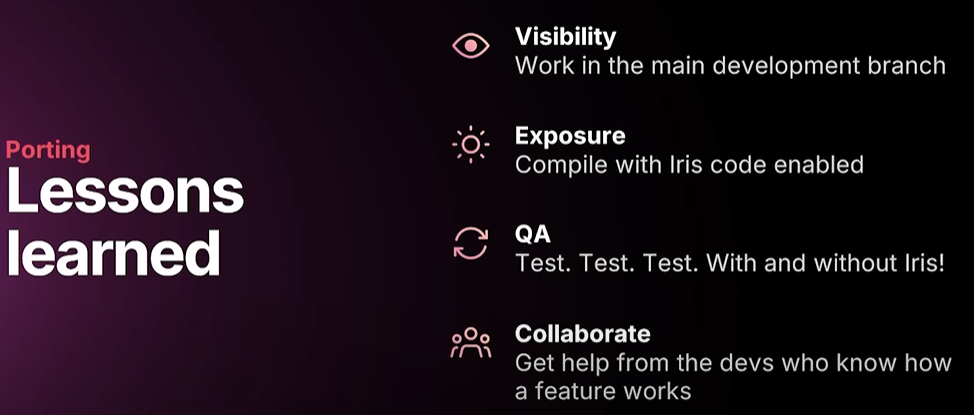
So some of the lessons learned work in the main development branch. We worked isolated for four years and that was quite painful. and as I mentioned the code changed a lot. So if you don't have your code alongside in the main branch, people can break your porting efforts. and you should also compile with your code enabled. We had a define everywhere to be able I mean not to impact the Fortnite executable size until it was ready to ship that you don't need to do that. Get QA involved early. test with and without Iris and test with and without package simulation particularly with package simulation and collaborate with those who knows the features that are going to be ported that will save a lot of time.
얻은 교훈 중 일부는 메인 개발 브랜치에서 작동합니다. 4년 동안 고립되어 작업했는데, 꽤 힘들었습니다. 앞서 말씀드렸듯이 코드가 많이 변경되었습니다. 메인 브랜치에 코드를 함께 두지 않으면 포팅 작업이 중단될 수 있습니다. 또한 코드를 활성화한 상태에서 컴파일해야 합니다. 라이브에 적용시키기 전까지 포트나이트 실행 파일 크기(executable size)가 영향을 받지 않도록 모든 곳에 정의를 두었습니다. 여러분은 그럴 필요가 없습니다. QA를 일찍 참여시키고, Iris를 사용하거나 사용하지 않고 테스트하고, 패키지 시뮬레이션을 사용하거나 사용하지 않고 테스트하고, 특히 패키지 시뮬레이션을 사용하여 포팅될 기능을 아는 사람들과 협력하면 많은 시간을 절약할 수 있습니다.

So some debugging tips and tricks. Network insights is a great tool to inspect the packet contents. on the top view you have the packet size and whether the packet was lost or not which is a lost packet is indicated by a red bar and on the bottom view you have the bit perfect packet contents. So make sure to use UE_NET_TRACE macros when you implement net serializers for example.
디버깅 팁과 요령을 알려드리겠습니다. Network Insights는 패킷 내용을 검사하는 데 유용한 도구입니다. 상단 뷰에는 패킷 크기와 패킷 손실 여부(손실된 패킷은 빨간색 막대로 표시됨)가 표시되고, 하단 뷰에는 bit perpect packet 내용이 표시됩니다. 따라서 넷 시리얼라이저 등을 구현할 때는 UE_NET_TRACE 매크로를 사용하는 것이 좋습니다.
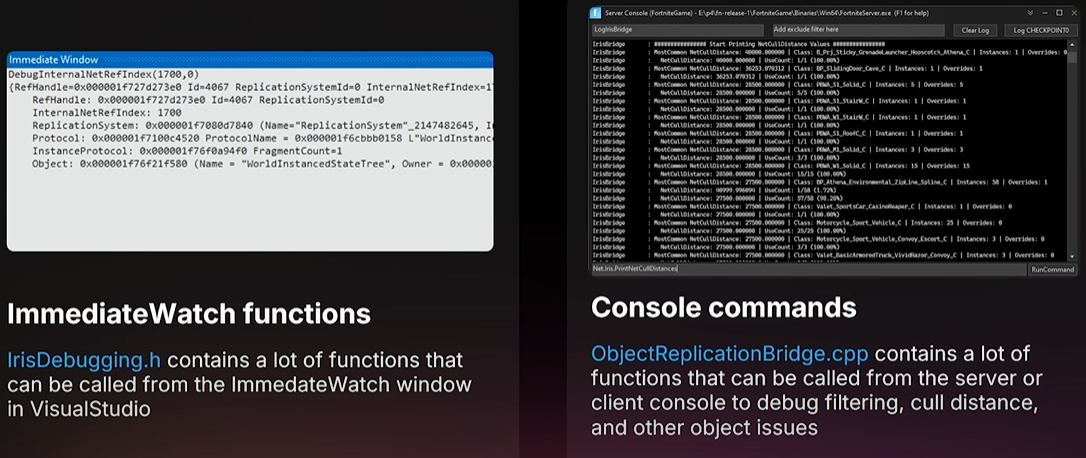
For runtime debugging we have a few functions you can call from the immediate watch window. for example to print state and other things very handy. they're located in Iris debugging.h. And we also have some console commands to help you debug filtering issues and CullDistance issues. they're located in object replication bridge debugging.cpp despite what it says there.
런타임 디버깅을 위해 즉시 감시 창에서 호출할 수 있는 몇 가지 함수가 있습니다. 예를 들어 상태 및 기타 정보를 출력하는 데 매우 유용합니다. 이 함수들은 Iris debugging.h에 있습니다. 또한 필터링 문제와 CullDistance 문제를 디버깅하는 데 도움이 되는 몇 가지 콘솔 명령도 있습니다. 이 함수들은 ObjectReplicationBridgeDebugging.cpp 파일에 있습니다.
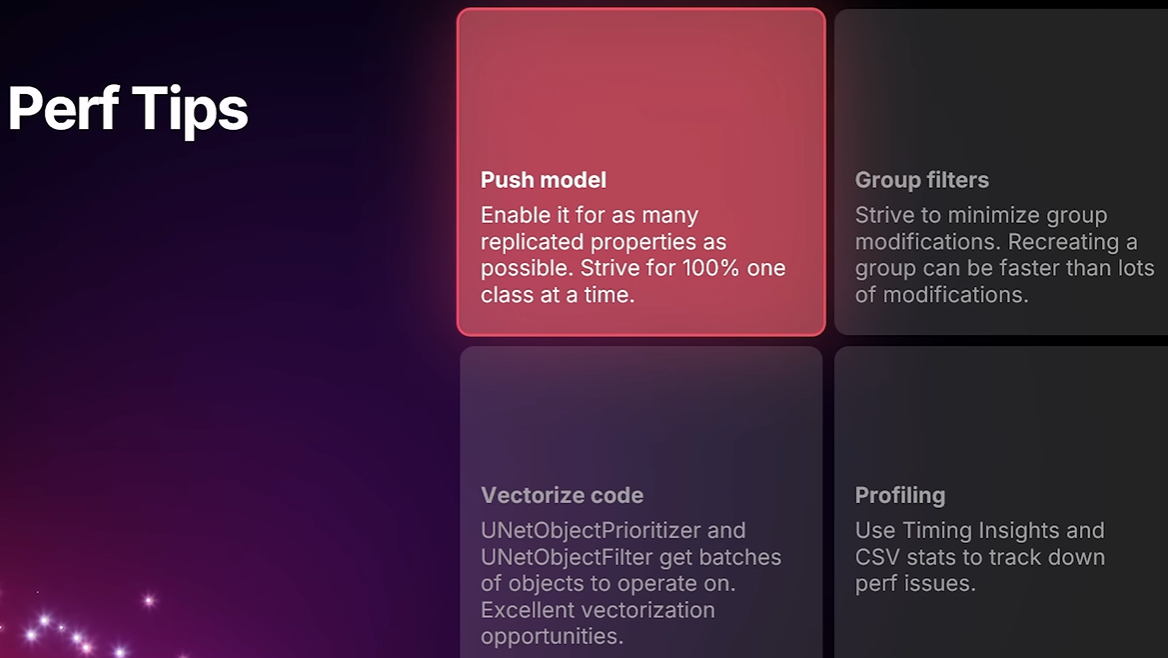
And some performance tips. While we try strive to be as performant as possible, we're also running your code. but one of the tips is use Push Model on your properties. That will save a lot of time. particularly during the polling phase, you're probably going to use exclusion groups and other groups a lot and strive to minimize your modifications to it. So sometimes it can be faster recreating a group if rather than doing lots of modifications. And since we work on batches of objects, you can vectorize your code in net object prioritizers and filters and use timing insights and CSV stats to track down perf problem and then if you want to deep dig deeper then use a sampling profiler.
몇 가지 성능 팁을 알려드리겠습니다. 최대한 성능을 높이기 위해 노력하는 동시에, 여러분의 코드도 실행하고 있습니다. 팁 중 하나는 프로퍼티에 Push Model을 사용하는 것입니다. 이렇게 하면 많은 시간을 절약할 수 있습니다. 특히 Polling Phase에서는 제외 그룹(exclusion group)과 기타 그룹을 많이 사용하고 수정을 최소화하려고 노력할 것입니다. 따라서 여러 번 수정하는 것보다 그룹을 다시 만드는 것이 더 빠를 수 있습니다. 또한, 오브젝트 묶음을 처리하기 때문에 NetObjectPrioritizer와 Filter에서 코드를 벡터화하고, 타이밍 인사이트와 CSV 통계를 사용하여 성능 문제를 추적할 수 있습니다. 더 자세히 알아보고 싶다면 샘플링 프로파일러를 사용하세요.
So what about the future?
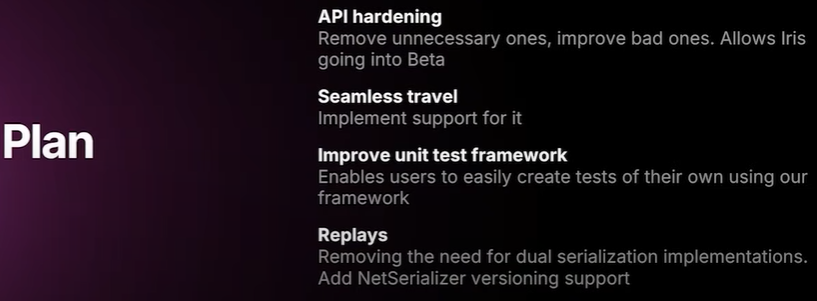
Well, Iris is still experimental and we want to go beta. so we will work on hardening the API. we haven't implemented support for seamless travel yet. we want to improve our unit test framework so you can write your own tests and also implement replay recording and playback. that's currently using old school replication. So you need to keep both serialization variants up to date if you if you have replays.
미래는 어떨까요? Iris는 아직 Experimental 단계이며 베타 버전을 출시하려고 합니다.(5.7~ Beta로 변경됨) 따라서 API 강화 작업을 진행할 예정입니다. 아직 Seamless Travel을 지원하지는 않습니다. 유닛 테스트 프레임워크를 개선하여 사용자가 직접 테스트를 작성하고 리플레이 녹화 및 재생을 구현할 수 있도록 할 예정입니다. 현재는 리플레이에 레거시 리플리케이션 방식을 사용하고 있습니다. 따라서 리플레이가 있는 경우 두 가지 직렬화 변형을 모두 최신 상태로 유지해야 합니다.
'UE5 > Iris' 카테고리의 다른 글
| [UE5] Iris Replication Flow 2 - Filtering (0) | 2025.06.14 |
|---|---|
| [UE5] Iris DefaultEngine.ini (1) | 2025.06.08 |
| [UE5] Iris Replication Flow - 1 (0) | 2025.05.22 |
| [UE5] Iris Replication - 2 (0) | 2025.05.22 |
| [UE5] Iris Replication - 1 (0) | 2025.05.21 |